

扫描手机二维码
开通时间:..
最后更新时间:..

的个人主页 http://faculty.ustc.edu.cn/gaoankang/zh_CN/index.htm

202.38.87.39
The login node should be not used for computing.
servers list |
public IP:ssh/xrdp port | private IP |
cores/RAM |
debian1 |
202.38.87.44:34/35 | 192.168.211.76 |
128/512GB |
debian2 |
202.38.87.44:91/95 | 192.168.211.106 |
128/512GB |
debian3 |
202.38.87.44:92/93 | 192.168.211.107 |
128/512GB |
ubuntu22 |
202.38.87.44:66/94 | 192.168.211.54 |
i7-12700/64GB |
debian1 is mainly used for post processing. Storage directories on debian2/3 and ubuntu22 can also be accessed from debian 1. The mapping relation is
ubuntu22:/StorageNektar -> debian1:/storage/ubuntuData1
ubuntu22:/StorageLBM -> debian1:/storage/ubuntuData2
debian2:/home2 -> debian1:/storage/debian2home2
debian2:/home3 -> debian1:/storage/debian2home3
debian3:/home2 -> debian1:/storage/debian3home2
debian3:/home3 -> debian1:/storage/debian3home3
Nodes are equipped with different numbers of processing cores. Use lscpu to find out about the number of logical cores ("CPU(s)"). These will show up as 256 cores, but this refers to hardware threads and two hardware threads will share an arithmetic unit on the CPU. Therefore, for compute intensive tasks, 256 cores will not provide twice the compute capacity of 128 cores. Please be conscious of other users on the system and check if the node is already in use (using top before running compute-intensive jobs.
Access is via SSH or RDP. Allocation of compute nodes to specific users is currently entirely informal
SSH access
First, you need to creat to tunnel in the powershell or other types of shell
ssh -L6666:202.38.87.44:34 username@202.38.87.39
Then, log into the port 6666 using any terminal,
ssh -p 6666 username@localhost
For users who prefer (or need) a graphical environment, such a desktop can be accessed using the standard remote desktop protocol (as used by Windows Remote Desktop).
First, you need to creat to tunnel in the powershell or other types of shell
ssh -L6666:202.38.87.44:35 username@202.38.87.39
Then, log into the port 6666 using any remote destop software,

If you close the remote desktop viewer on your local computer without selecting Logout, your session will continue running. Connecting as normal will reconnect you to your existing session. Sessions which have been idle for 14 days or more will be automatically terminated to free resources for other users.
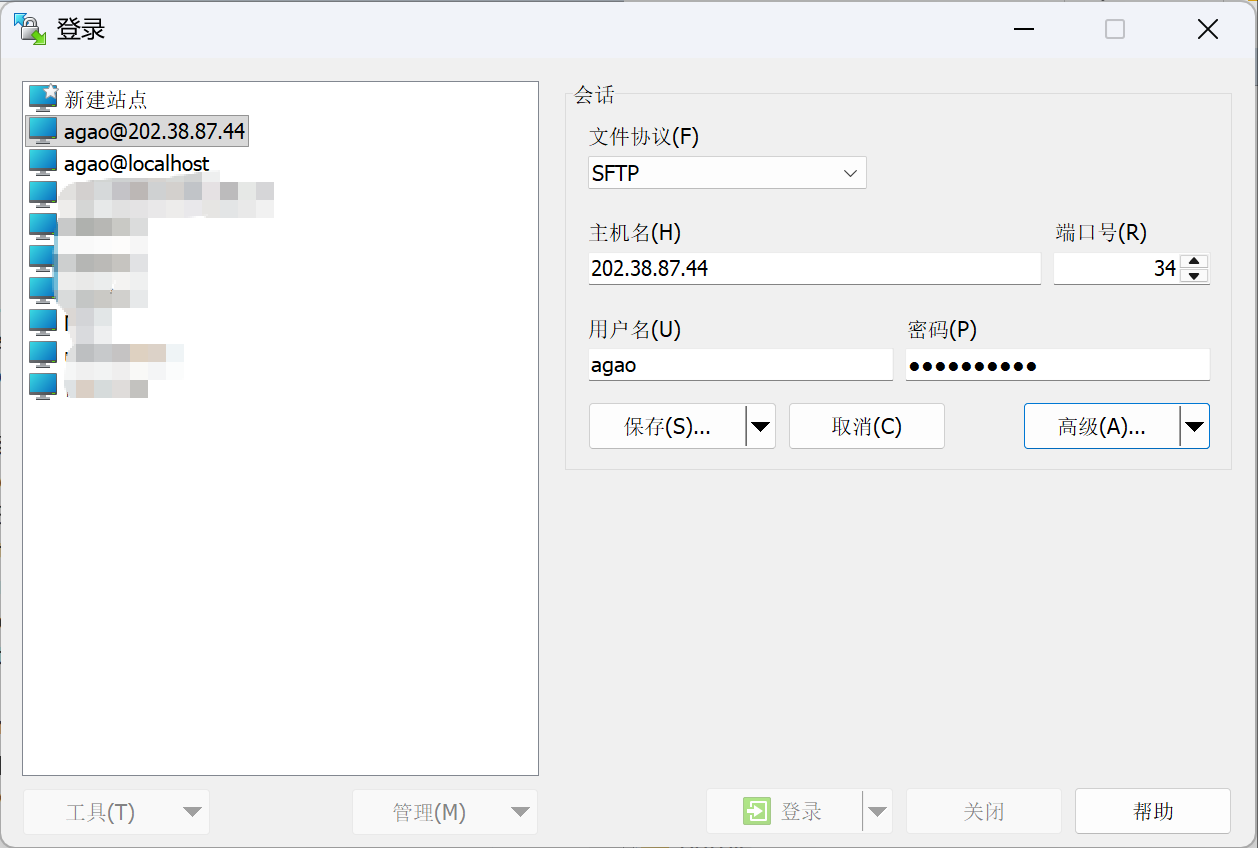
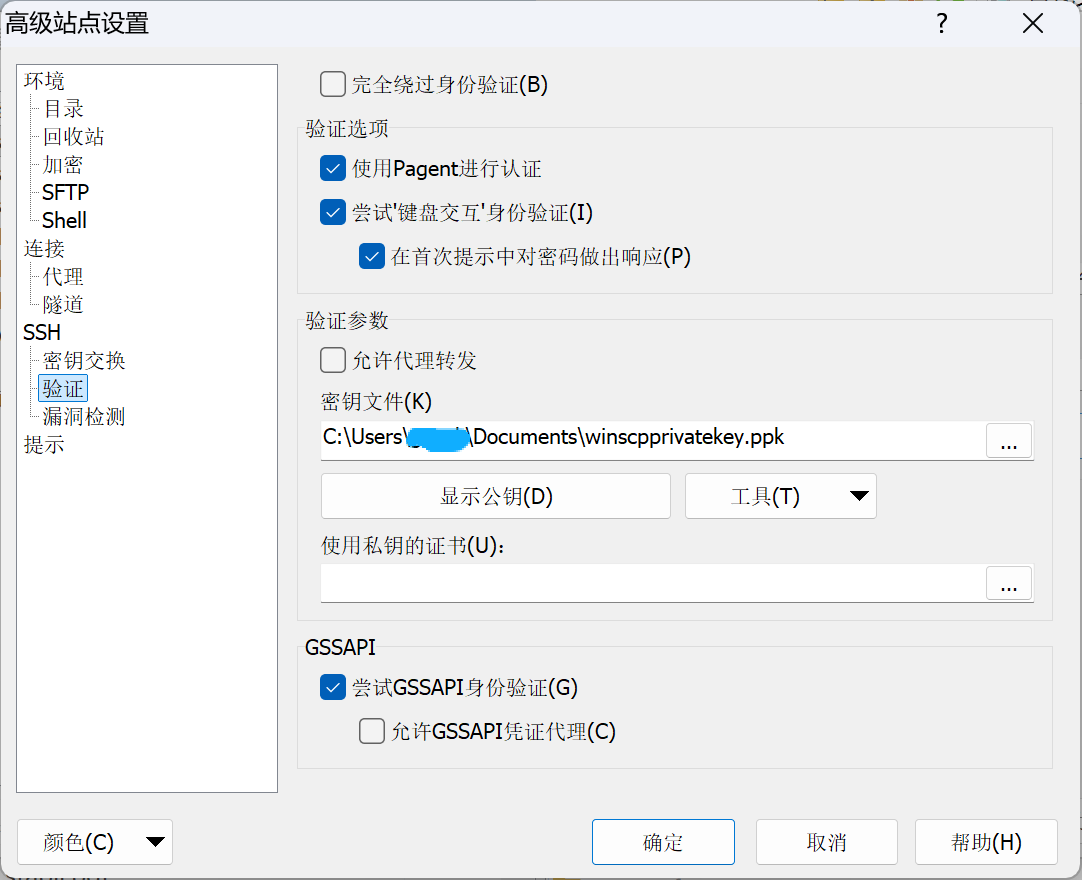
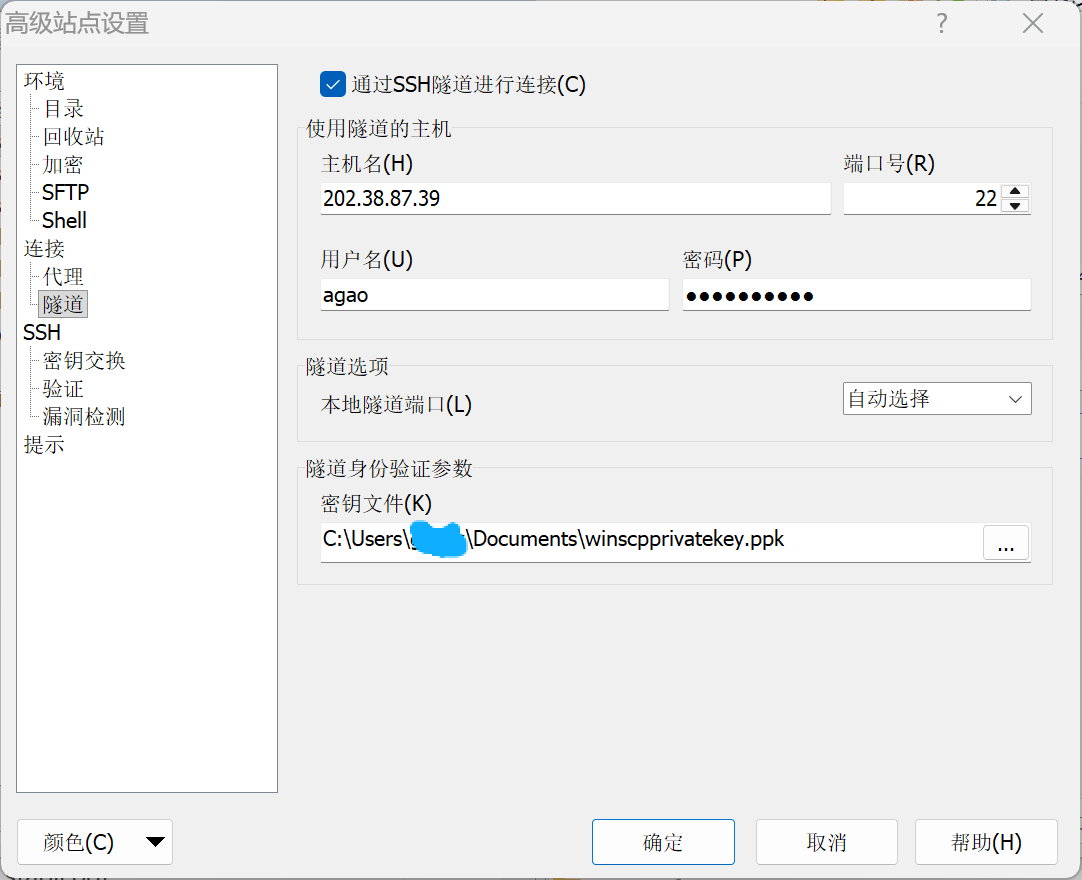
Connect with Winscp
首先,新建一个站点,主机名和端口选择外部ip地址和端口。
高级设置中,选择隧道,隧道主机为登录节点,添加验证密钥。即可链接使用。
Once you have logged into one of the compute nodes you can change your password by running the passwd command from a terminal. You will be prompted to enter your old password first and then supply a new password. The new password must:
Be non-trivially different from your old password
Contain characters from at least three of the character groups: lowercase letters, uppercase letters, numbers, symbols. Uppercase letters at the beginning and numbers at the end do not count!
Be at least 8 characters long
Some standard and non-standard software is provided as modules which can be loaded by the user. For instance the Boost libraries and Matlab are available as modules. Here are some useful commands:
List available modules: module avail
Load a module: module load module-name
Unload a module: module unload module-name
Show loaded modules: module list
To run Matlab in the graphical environment:
Open a terminal
Load the Matlab module: module load matlab
Run matlab: matlab
Here are some useful commands:
du -sh - check how much space the current directory occupies
df -h - check how much space is left on shared and local storage
